 Podcast Clip Kit
Home Podcast Studio for Shorts: Plan the Recording Before the Clip
Use a real room deliberately, then test the recording before committing to a full conversation.
A home podcast studio has to work twice: once for the full conversation, and again for the short videos you will make from it. Before buying another light or changing the furniture, test whether your room lets people hear the conversation, see the speakers and understand a vertical clip.
Boy Problems offers a useful starting point. In a June 2026 Spotify interview, Liz Plank described recording in her bedroom partly because of budget and partly because she wanted to feel on the same level as her audience. A home setting was an editorial choice as well as a practical one.
A room that fits the conversation
Plank's June 2025 launch announcement introduced a show about relationships, difficult questions and candid conversations, with Delaney Rowe as the first guest. She also invited listeners to submit their own problems. That invitation helps explain the kind of atmosphere a home recording can support: a conversation someone feels welcome to join.
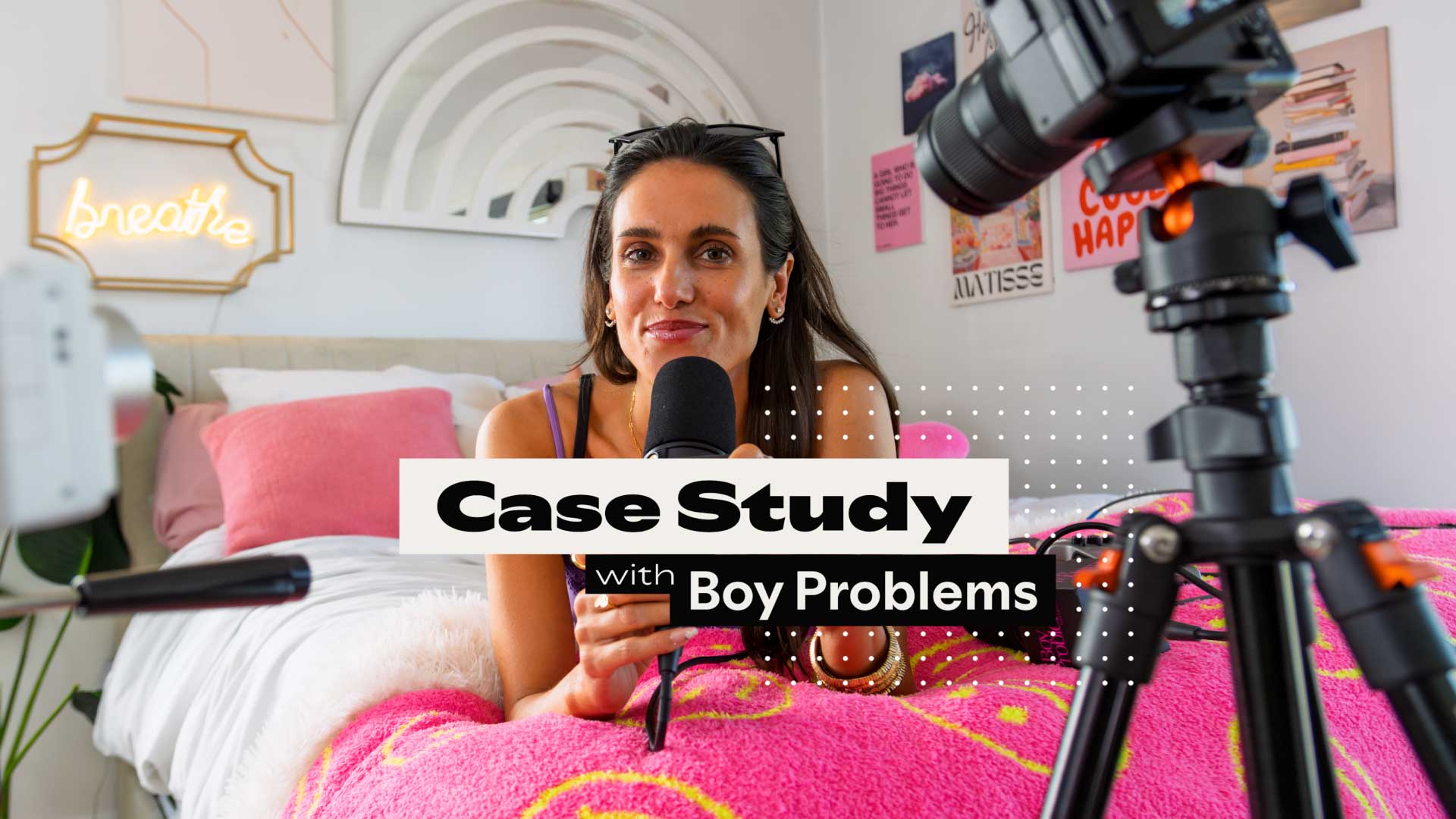
Spotify's official case photograph shows Plank holding a microphone, with a bed and cushions behind her and a camera in the foreground. It makes the room and recording equipment visible together. Use the photograph as a prompt to decide which parts of your own room belong in the picture and which should stay outside it.
You do not need the same bedroom, colors or camera. Start by describing the experience your program promises. A personal conversation, a product demonstration and a panel discussion need different things from a room. Choose a setup that supports the actual conversation you plan to record.
Separate the room into three practical areas
Make a simple floor note before recording. Mark the speaking area, the visible background and the route people need to move through. These areas can overlap in a small room, but identifying them helps you spot avoidable interruptions.
- Speaking area: where the host and guest sit, where microphones can remain stable, and where hands or demonstration objects will move.
- Visible background: what appears behind each speaker in the full frame and in a vertical crop.
- Access route: how someone reaches the door, adjusts a light or leaves without pulling a cable or crossing the recording.
Keep your arrangement easy to restore. A photo of the setup and a short note about chair, microphone and camera positions are often more useful for the next session than a shopping list. If the room returns to normal use between recordings, include the order in which you rebuild it.
Check what the camera reveals
A familiar room can contain details you stop noticing. Before inviting a guest, examine the actual recording frame for mail, screens, calendars, family photographs and reflections. Decide deliberately what you are comfortable publishing.
Check from the guest's position as well as the host's. A mirror or reflective screen may show an area outside the main background. A wider shot used for an introduction can reveal more than the close view used during the conversation.
Agree on interruptions with anyone sharing the space. Silence notifications, choose where phones will sit and decide what happens if someone enters. These are preparation choices for your own shoot; the goal is a room you can use confidently, without discovering personal information in a clip after export.
Record a sample before the full episode
Make a short test using the same seats, microphones, lighting and camera settings planned for the episode. Have both people speak normally, turn toward each other and move as they would during the discussion. Include an overlap or a laugh if that happens naturally.
Play the recording back. Listen for words lost under room noise, uneven speaker levels or contact with the microphone. Watch for changes in brightness, blocked faces and objects entering the foreground. Adjust one thing, then repeat the part of the test that failed.
Review the saved file rather than relying only on the camera's live screen. The file is what your editor and podcast clip maker will receive. Record where it was saved and confirm you can open it before starting the longer conversation.
Test a vertical view while you can still move the chairs
Use the sample to preview the vertical framing you intend to publish. Check each speaker separately and any moment when both need to be visible. A comfortable full-width conversation can require a different composition for a Short.
- Does the speaker remain visible when leaning forward or turning toward the guest?
- Can the other person's response be included when it changes the meaning?
- Is a product, document or other referenced object still understandable?
- Is there usable space for captions without covering the mouth or relevant object?
- Does the background remain intentional when only a narrow part of the room is visible?
If the test fails, move the subject or camera and record again. Solve the problem while everyone is still in the room. Save a sample frame with your setup notes so the next recording starts from a checked arrangement.
Keep the production notes small enough to reuse
Give the next session a six-line setup card: room layout, camera position, microphone position, lighting arrangement, background check and file location. Add a link to the sample that passed review. Record a change only when it affects what someone needs to repeat.
After the episode, add one observation from the clip review. Perhaps the guest repeatedly leaned outside the useful crop, or a foreground object covered a hand gesture. Turn that observation into a specific adjustment for the next recording. This connects the podcast-to-shorts workflow back to the room instead of leaving every correction to the editor.
Turn the checked recording into podcast clips
When the source is ready, upload your video to Podcast Clip Kit and review the generated clip candidates. Use the original conversation to check the opening, ending and who is speaking. Preview captions and framing before exporting the clips you choose.
An AI podcast clip generator helps you assemble candidates for review; your setup card supplies the context about what the recording needs to preserve. For examples of that review, see keeping visual context and preserving a useful reaction.
The next improvement should follow an observed problem: clearer voice, a repeatable camera position or a frame that survives the intended crop. Let your recorded test tell you what the home studio needs next.