 Podcast Clip Kit
Podcast Repurposing Workflow: From AI Clips to Final Approval
Use Lenny Rachitsky’s production handoffs to organize your own podcast clips, from the first candidate to the approved export.
A podcast repurposing workflow needs a clear finish line. After an interview, there may be a full episode, several podcast clips, a trailer, titles and guest-sharing assets to prepare. If each item lives in a different message thread, the difficult question becomes: which version is actually ready to publish?
Lenny Rachitsky’s account of producing his podcast offers a practical starting point. His team handles production while he continues to review the work. For a smaller team using an AI podcast clip generator, that division suggests a useful approach: make the handoff and approval process explicit, even when one person performs several roles.
Lenny’s workflow: delegate production, keep the review
In his March 2024 account of his podcast workflow, Rachitsky described working with Pen Name on core production and Supermix on social clips and trailers. He also described sharing final audio, video and accompanying publication assets with guests before release. His studio photograph, linked below, shows the recording setup behind that process.
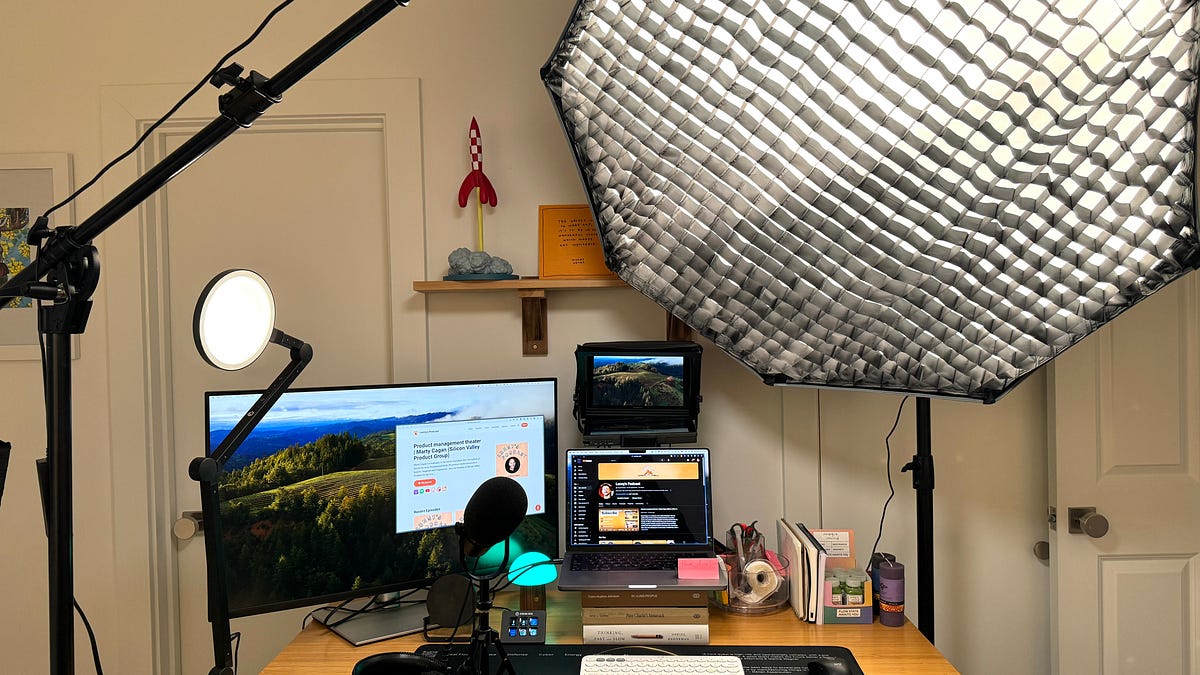
A March 2025 follow-up describes two boutique agencies handling production, packaging, clips and publishing while he continued reviewing the output. He put his own involvement at three to five hours per episode, including preparation, recording and review. That is the host’s time, with a production team contributing alongside him.
The useful design question for your own workflow is where decisions belong. Who proposes the clips? Who checks their meaning? Who approves the title and final export? A podcast clip maker can help produce candidates; your release process should make it easy to identify which candidates have passed review.
1. Create one episode brief before generating clips
Give each recording an episode ID and one shared brief. Include the source file, guest’s preferred name, intended audience and destination for the full episode. Add any agreed publication timing or sections requiring review. These details give every output a common reference.
Write the brief so another person can act on it without reading a long chat history. Instead of “find the good bits,” describe a viewer question the episode answers. Instead of “make it more exciting,” identify a passage to inspect and explain what the viewer should understand. Keep the brief editable as you learn which moments work on their own.
If the full episode is still being edited, label that clearly. A timestamp in the raw recording may point somewhere different in the final episode. Keep the source filename and version beside each timestamp so later changes can be checked against the right recording.
2. Give each podcast clip its own review record
When you turn a podcast into Shorts with AI, treat generated clips as the beginning of a review queue. Give each candidate an ID and a purpose: answer a specific question, explain a process, preserve a funny exchange or introduce a larger discussion.
Use the following fields in a spreadsheet, document or project board. Start with only as many candidates as you can review carefully; a long queue has little value if nobody knows what to do next.
| Field | What to enter |
|---|---|
| Episode and clip ID | A stable identifier that stays with the export and publication record. |
| Source version and range | The exact recording and the passage being reviewed. |
| Viewer question | The single question or moment this clip should resolve. |
| Context to preserve | A setup, qualification, visual detail or response the viewer needs. |
| Reviewer and next action | One person responsible for advancing the candidate. |
| Approved export and title | The file and wording that passed the final check. |
| Publication destination | The account, planned post and matching full episode. |
The record should answer a concrete question at every stage: what needs to happen before this piece can move forward? “In progress” is less useful than “check the guest’s name in captions” or “include the preceding question.”
3. Separate meaning review from presentation review
Review the source conversation first. Check whether the clip includes the setup, preserves the speaker’s qualification and reaches an understandable ending. If the passage needs more context, resolve that before polishing the title or captions. Our guide to choosing podcast clips can help with this decision.
Then review the actual export. Listen for cut-off words, compare captions with the audio and watch at phone size. Look for names, numbers and short words that change meaning. Check whether the crop and captions obscure a reaction or an image the speaker refers to. These are specific review tasks you can assign, complete and record.
Keep feedback tied to a version and location. “The caption at 00:12 spells the guest’s name incorrectly” gives an editor a clear action. Once corrected, review that point in the new export and confirm that the beginning and ending still work. Avoid approving from a source preview when the file being published has changed.
4. Approve the package that will actually be published
A finished video and its accompanying title should tell the same story. Review the export, title, description and full-episode destination together. A careful edit can still be misrepresented by a title that removes a qualification or promises an answer the clip never supplies.
If your guest agreement includes pre-publication review, specify what is being reviewed and when you need feedback. Keep requested changes in the same record as the candidate. When feedback changes the edit, update the approved version rather than leaving two apparently final files in circulation.
For a solo creator, use separate passes instead of separate people. Finish the meaning review, take a break, then inspect the publication package as a new viewer. For a team, name one final approver. In both cases, the release record should point to a single approved export.
5. Use Podcast Clip Kit for the candidate-creation step
Podcast Clip Kit gives you an AI podcast clip maker for working from your video. Upload a recording you have permission to use, generate candidate clips, preview the results and download the exports. Use your episode brief to decide which candidates belong in the release queue.
Keep the approval record in your shared document or project board. Place the exported filename beside its title and source reference. This connects the work you do in an AI podcast clip generator with the decisions you make before publishing, and gives the next reviewer a clear starting point.
6. Close the loop after publication
Add the live post URL and publication date to the same record. At a consistent review interval, record the platform’s own viewing metrics and any attributable episode activity. Our podcast clip analytics guide explains how to keep those measures distinct.
Also review the production process. Which candidates needed another context check? Which captions repeatedly needed correction? Did a last-minute title change cause extra work? Turn one recurring issue into a clearer instruction for the next episode.
Start with one recording and a small, reviewable batch. Give each clip a purpose, an owner and an approved final version. Then upload your video to Podcast Clip Kit and use the same process from the first candidate to the published post.